User Help System
Submitting a Derived Block Trade
Use the Deal Entry screen in the Trade Blotter to submit a Derived Block futures or options trade on CME Platform. For a Derived Block trade, the final price and quantity are not fixed at the time of the initial agreement, but are derived from hedging transactions that occur in a related market immediately after the deal is made.
Submitting a Derived Block Futures Trade
- To submit a Derived Block futures trade
- On the Trade Blotter screen, select the Enter Trade (
 ) icon.

- Select Derived Block as the Trade Type.

- Select one of the following hedging methods and enter a Hedge Description (if required):

Block Hedge: Select from a list of available derived block hedge types:
- VWAP: Volume Weighted Average Price.
- TWAP: Time Weighted Average Price.
- POV: Percentage of Volume. Enter a percent value in the Hedge Description field for POV derived-price blocks.
- Limit: Limit order. Enter a Limit price in the Hedge Description field for limit order derived-price blocks.
- Other: Enter how the hedge price is derived in the Hedge Description field.
- Enter an underlying Reference Hedge Product and Basis. These are required fields.

The basis value is the agreed upon difference in index points between the reference hedge product and the futures derived block trade.
- Select a futures Product and Term, and enter an order Quantity and Price.

- Enter the following trade entry details:

- Participant details for the Buyer and Seller.
- The Start Time and End Time of the hedging transaction as well as the Execution Date and Execution Time of the block trade (i.e., the time the block trade was agreed to). These are required fields.
- Select Submit Trade.
- Verify the trade entry details on the Deal Validation screen and select Submit.

The deal is submitted successfully and appears in the Trade Blotter.
Submitting a Derived Block Options Trade
- To submit a Derived Block options trade
- On the Trade Blotter screen, select the Enter Trade ( ) icon.
- Select Derived Block as the Trade Type.
- Select one of the following hedging methods and enter a Hedge Description (if required):

Block Hedge: Select from a list of available derived block hedge types:
- VWAP: Volume Weighted Average Price.
- TWAP: Time Weighted Average Price.
- POV: Percentage of Volume. Enter a percent value in the Hedge Description field for POV derived-price blocks.
- Limit: Limit order. Enter a Limit price in the Hedge Description field for limit order derived-price blocks.
- Other: Enter how the hedge price is derived in the Hedge Description field.
- Enter an underlying Reference Hedge Product, Option Price, and Reference Level. These are required fields.

The Option Price is the initially quoted option price. The Reference Level is the initially quoted hedge price of the hedging instrument.
- Select an options Product, Term, Strike, and Quantity and select thePrice Validation checkbox. Price validation may not be required if a settlement price is available and passes the automated price check.

- Enter the following trade entry details:
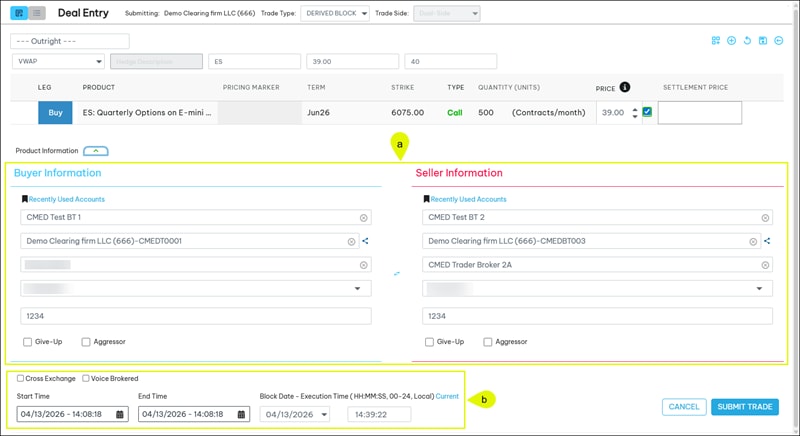
- Participant details for the Buyer and Seller.
- The Start Time and End Time of the hedging transaction as well as the Execution Date and Execution Time of the block trade (i.e., the time the block trade was agreed to). These are required fields.
- Select Submit Trade.
- Verify the trade entry details on the Deal Validation screen and select Submit.
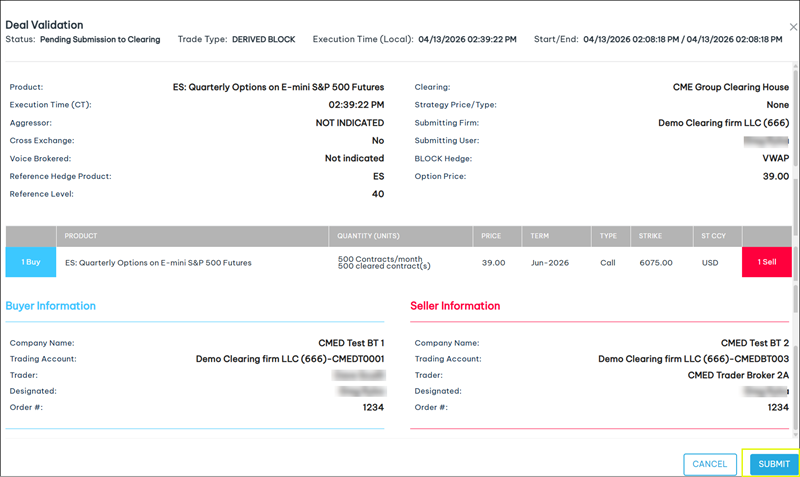
The deal is submitted successfully and appears in the Trade Blotter.


