User Help System
Entering a Strip Trade
As a trader or broker on the CME Platform, you have the option to expand a strip trade into individual legs within the trade entry ticket. This allows you to simply update specific price, quantity, or term parameters to create a custom strategy.
- To enter a strip trade
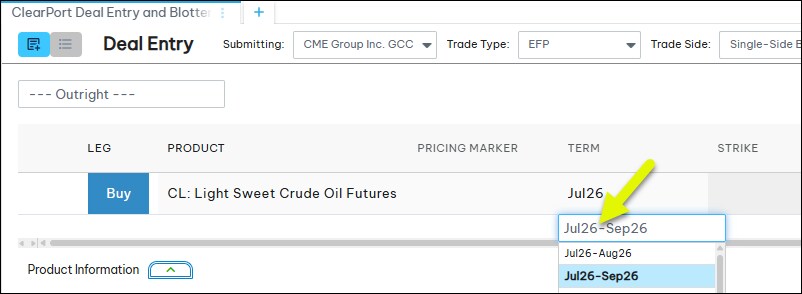
- Select a term and enter a hyphen "-" after the front month.
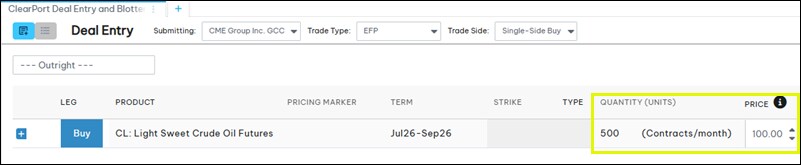
- Enter a quantity and price for the strip.
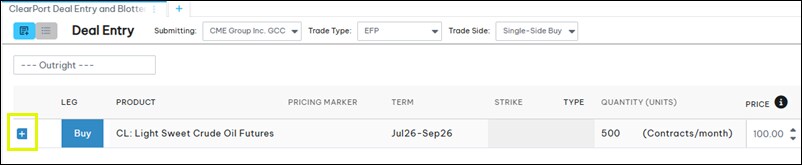
- Select the plus sign (
 ) to expand the consecutive terms.
- Update the price and quantity of each leg if needed.
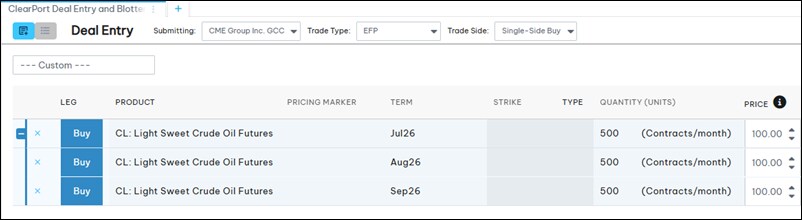
Legs can be added or removed. If a leg is added, if defaults to the next term and inherits the quantity and price of the previous term. Select the minus sign ( ) to collapse the strip.
Note: Changing individual leg prices/quantities or removing a leg from the middle of the sequence will automatically convert the trade from a Strip to a Custom Multi-Leg Strategy upon submission.
- Enter the participant details and date and time, and submit the trade.


