User Help System
Entering Hedges
Use the Hedges section of the Trade Entry form to submit hedges for clearing.
Adding Hedge Legs
The Trade Entry form allows you to add multiple future hedge legs on an Option strategy and select a different Underlier Product as needed.
Note: You cannot add option legs to a strategy, nor can you add future legs to a non-option strategy.
Use the Add Hedge button to add a hedge leg.
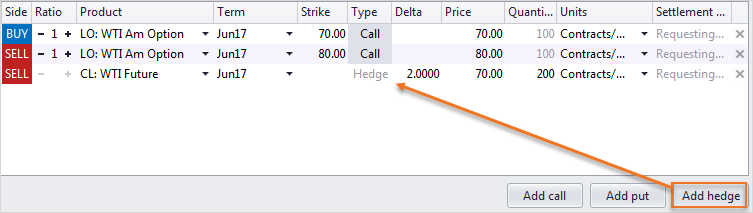
Note: The term on a hedge leg can be modified irrespective of the terms defined on the Option legs, by simply clicking in a Term cell and selecting a new term from the list.
To change the underlier product, click in an Underlier Product cell and from the drop-down list select a different product, or type a new product directly in the cell.
Entering Hedge Quantities
The Hedges section allows users to edit the quantity for a hedge. You change the hedge quantity by entering a new quantity directly in the Quantity field on.
Note: Updating the hedge leg quantity causes the delta to be recalculated and rounded accordingly.
Changing Hedge Buy/Sell Side
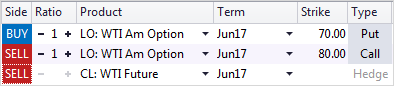
The Trade form allows user to change the Buy/Sell side for hedges. For example, the side for a FENCE hedge defaults to BUY. Click directly on the BUY cell and he hedge side changes to SELL.
Entering Deltas
Delta hedges support 4 decimal places (DP) in order for brokers to enter deltas of 1/2s and 1/4s.
View Hedge Instrument Term for Covered Options
Hedge display enhancements allow users to view the Term for a Hedge instrument when building a covered option.
Note: The Hedge term for covered Options displays always, whereas it previously displayed only if the Hedge term was different from the Options term.
- To view the term of the Hedge instrument for a covered spread:
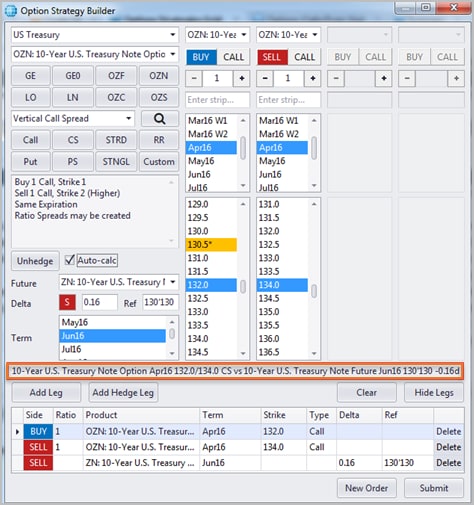
The example below illustrates viewing the term in the Options Strategy Builder. The enhanced term displays in the Options Grid also.

- From the Strategies or Options Grid, click Add Strategy.
The Option Strategy Builder appears.
- Create a covered spread using the available fields.
- To create a Hedge leg, click Hedge and enter a Delta.
The term for the Hedge instrument appears automatically in the contract description.
Display Hedge Name
Trading Grids display the name of the hedge for covered strategies, which matches the text on Tooltip.



