User Help System
Cancel on Behalf
The Cancel on Behalf (COB) function allows authorized firm users to specify Globex Firm ID (GFID) Sessions that can cancel resting futures and options orders and mass quotes for their Order Entry / iLink sessions.
See also: iLink Trading on Behalf of a Client - Cancel on Behalf (COB)
- To access Cancel on Behalf:
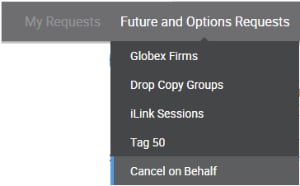
- From the CME Customer Center menu, select Request Center (ESS) > Futures & Options Requests > Cancel on Behalf.
- Select a Registered Entity and Globex Firm ID to manage.
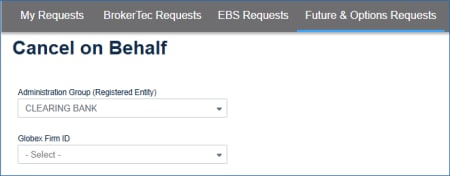
iLink Sessions associated with the selected AG and GFID will appear.
The current status of the session is shown on the Cancel on Behalf Enabled column.
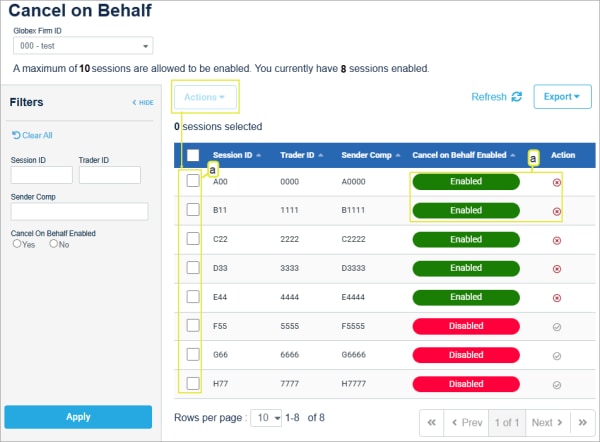
- Select from available Session IDs (up to ten).
- Select up to ten sessions, then select Actions

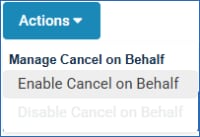 > Enable Cancel on Behalf or Disable Cancel on Behalf.
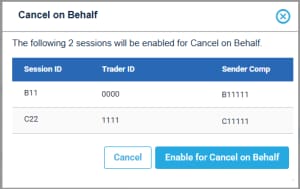
or
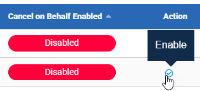
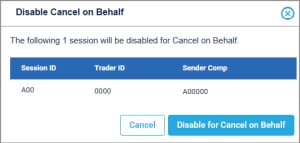
- Enable / Disable COB: From the sessions list, on the Action column select Enable or Disable.
On the dialog that appears, confirm the selection.
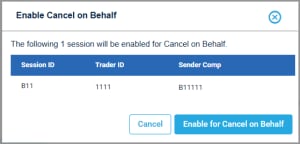 /
/ 
Note: After completing the action, a confirmation message appears and an email is sent to the requestor. 


