User Help System
Search Portfolios in the Rates Screen
Use Search to filter portfolios on any search term within the Name, Account or Firm fields.
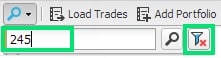
- To search portfolios:
- Select the magnifier
 icon and enter a search term in the box. Only portfolios that match the entered term in any part of the Name, Account or Firm fields display.
 - To clear the search "filter," select the filter icon. All portfolios display.


