User Help System
Receiving and Processing Multiple Gaps (Mass Quote)
The purpose of this test is to verify that the client system can process newly detected gaps in response to a Retransmit Request.
Note: This test is used for both Pre-Registered and On-Demand formats. The image below shows the Pre-Registered format version of the test.
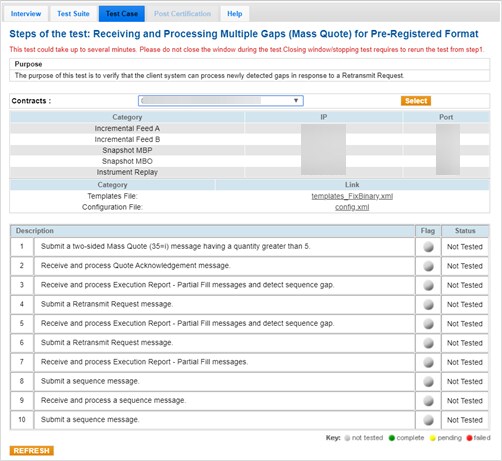
- To run a Receiving and Processing Multiple Gaps (Mass Quote) test:
- Select a SenderComp from the drop-down and select ASSIGN if a SenderComp is not already assigned.
- Select the START TEST button.
Note: DO NOT select the START TEST button once the test process is in progress.
- Submit a two-sided Mass Quote (35=i) message having a quantity greater than 5.
- Receive and process a Quote Acknowledgment message.
- Receive and process Execution Report - Trade Outright [39=1 (Partially Filled)] messages and detect a sequence gap.
- Submit a Retransmit Request message.
- Receive and process Execution Report - Trade Outright [39=1 (Partially Filled)] messages and detect a sequence gap.
- Submit a Retransmit Request message.
- Receive and process Execution Report - Trade Outright [39=1 (Partially Filled)] messages.
- Submit a Sequence message.
- Receive and process a Sequence message.
- Submit a Sequence message.


