User Help System
MSGW Failover from Primary to Backup Components (Binding without Initialization)
The purpose of this test is to verify that your system can recover and continue to function properly during a primary MSGW failover.
Pre-Registered or On-Demand Format
Note: This test is used for both Pre-Registered and On-Demand formats. The image below shows the Pre-Registered format version of the test.
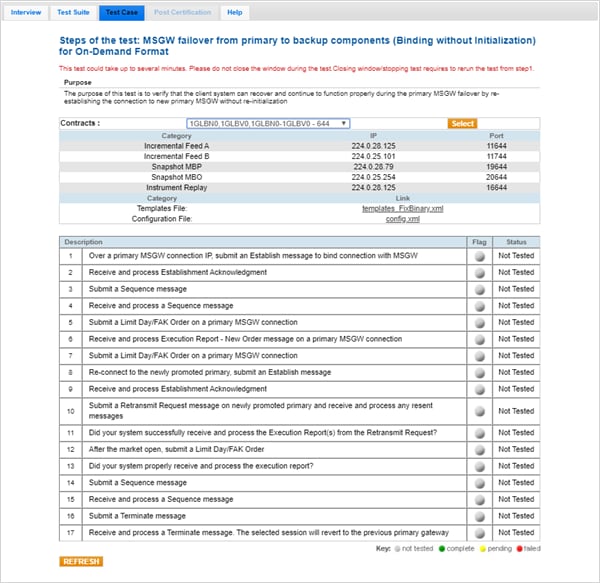
Note: If a test is not proceeding to the next step, selecting the Refresh button ( ) below the test steps may resolve the issue.
- To run an MSGW Failover from Primary to Backup Components (Binding without Initialization) test:
- Select a SenderComp from the drop-down and select ASSIGN if a SenderComp is not already assigned.
- Click the START TEST button.
Note: DO NOT select the START TEST button once the test process is in progress.
- Over a primary MSGW connection IP, submit an Establish message to bind the connection with the MSGW.
- Receive and process the Establishment Acknowledgment message.
- Submit a Sequence message.
- Receive and process a Sequence message.
- Submit a Limit Day Order on a primary MSGW connection.
- Select Yes or No to indicate whether your system received and processed the Execution Report - New Order message on a primary MSGW connection.
- Submit a Limit Day Order on a primary MSGW connection.
- Re-connect to the newly promoted primary, submit an Establish message.
- Receive and process Establishment Acknowledgment.
- Submit a Retransmit Request message on newly promoted primary and receive and process any resent messages.
- Select Yes or No to indicate whether your system received and processed the Retransmit Request?
- After the market open, submit a Limit Day Order.
- Select Yes or No to indicate whether your system received and processed the Execution Report - New Order?
- Submit a Sequence message.
- Receive and process a Sequence message.
- Submit a Terminate message.
- Receive and process a Terminate message. The selected session will revert to the previous primary gateway.


