User Help System
iLink Order Mass Status Request for all working orders for an instrument group for Pre-Registered Format
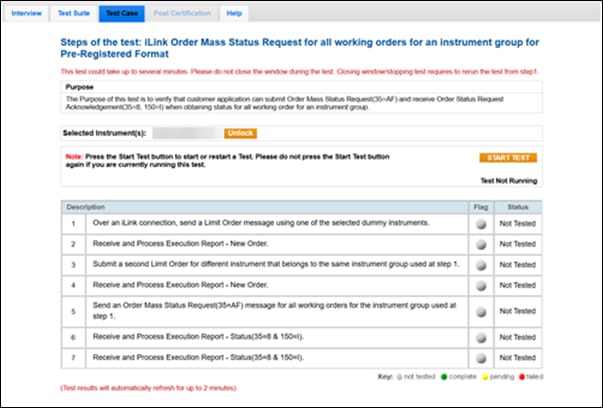
The Purpose of this test is to verify that the customer application can submit an Order Mass Status Request (35=AF) and receive an Order Status Request Acknowledgement (35=8, 150=I) when obtaining status for all working orders for an instrument group.
This test case is mandatory if you selected Instrument Group in the interview question Which Mass Order Status Functionality does your system support?
- To run the test
- On the Test Case tab, use the Instrument(s) drop down menu to choose an instrument and channel and click SELECT.
- Select START TEST.
- Over an iLink connection, send a Limit Order using one of the selected dummy instruments.
- Select Yes or No to indicate whether your system received and processed the Execution Report - New Order (35=8,39=0) message.
- Submit a second Limit Order for a different instrument in the same instrument group used in Step 3.
- Select Yes or No to indicate whether your system received and processed the Execution Report - New Order (35=8,39=0) message.
- Send a Order Mass Status Request (35=AF) message for all working orders for the instrument group used at Step 3.
- Receive and process Execution Report - Status (35=8 & 150=I) for the first order.
- Receive and process Execution Report - Status (35=8 & 150=I) for the second order.