User Help System
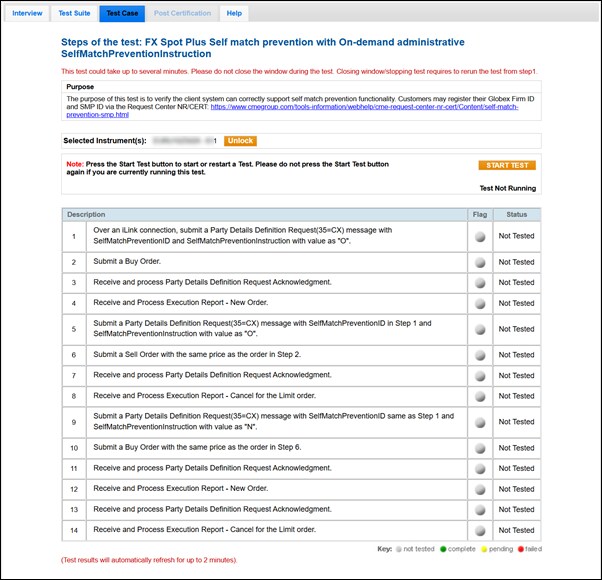
FX Spot Plus Self match prevention with On-demand administrative SelfMatchPreventionInstruction
The purpose of this test is to verify the client system can correctly support Self Match Prevention functionality. Customers may create and register their Globex Firm ID and SMP ID via the Request Center NR/CERT.
This test case is mandatory if you selected Yes in the interview question Will your system support Self Match Prevention?, and if you also selected On-demand in the interview question How does your application register Administrative Information?
- To run the test
- On the Test Case tab, use the Instrument(s) drop down menu to choose an instrument and channel and click SELECT.
- Select START TEST.
- Submit a Party Details Definition Request (35=CX) message with a tag 2362-SelfMatchPreventionID value and a tag 8000-SelfMatchPreventionInstruction value of "O" to the Service Gateway for trading FX Spot Plus.
- Submit a Buy order.
- Select Yes or No to indicate whether your system received and processed the Party Details Definition Request Acknowledgment (35=CY).
- Select Yes or No to indicate whether your system received and processed the Execution Report - New Order (35=8,39=0) message.
- Submit a Party Details Definition Request (35=CX) message with the same tag 2362-SelfMatchPreventionID value as Step 3 and a tag 8000-SelfMatchPreventionInstruction value of "O" to the Service Gateway.
- Submit a Sell Order with the same price as the order in Step 4.
- Select Yes or No to indicate whether your system received and processed the Party Details Definition Request Acknowledgment (35=CY).
- Select Yes or No to indicate whether your system received and processed the Execution Report - Cancel (35=8,39=4) message for the Limit order. You should receive tag 378-ExecRestatementReason=103 (Cancel Resting due to Self Match Prevention).
- Submit a Party Details Definition Request (35=CX) message with the same tag 2362-SelfMatchPreventionID value as Step 3 and a tag 8000-SelfMatchPreventionInstruction value of "N" to the Service Gateway for trading FX Spot Plus.
- Submit a Buy Order with the same price as the order in Step 8.
- Select Yes or No to indicate whether your system received and processed the Party Details Definition Request Acknowledgment (35=CY).
- Select Yes or No to indicate whether your system received and processed the Execution Report - New Order (35=8,39=0) message.
- Select Yes or No to indicate whether your system received and processed the Party Details Definition Request Acknowledgment (35=CY).
- Select Yes or No to indicate whether your system received and processed the Execution Report - Cancel (35=8,39=4) message for the Limit order. You should receive tag 378-ExecRestatementReason=107 (Cancel Aggressing due to Self Match Prevention).