User Help System
FX Spot Plus Market-Limit Order Test for On-Demand Format
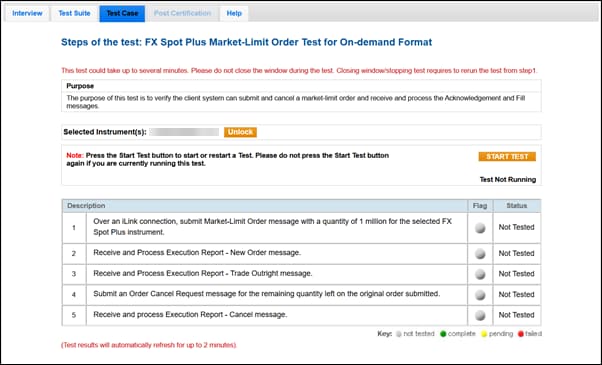
The purpose of this test is to verify the client system can submit and cancel a Market-Limit order, and receive and process the Acknowledgement and Fill messages .
This test case is mandatory if you selected Market Limit Order in the interview question Which order types will your system support?
- To run the test
- On the Test Case tab, use the Instrument(s) drop down menu to choose an instrument and channel and click SELECT.
- Select START TEST.
- Over an iLink connection, submit a Market-Limit Order message with a quantity of 1 million for the selected FX Spot Plus instrument.
- Select Yes or No to indicate whether your system received and processed the Execution Report - New Order (35=8,39=0) message.
- Select Yes or No to indicate whether your system received and processed the Execution Report - Trade Outright (35=8,39=1, 2) message.
- Submit an Order Cancel Request message for the remaining quantity left on the original order submitted.
- Select Yes or No to indicate whether your system received and processed the Execution Report - Cancel (35=8,39=4) message.