User Help System
/*]]>*/
Receive Encapsulated Message from Simulated Order Mass Action Messages
This test verifies that your system can successfully receive an Order Mass Action Report [35=BZ, 1375-MassActionResponse=1 (Accepted)] message.
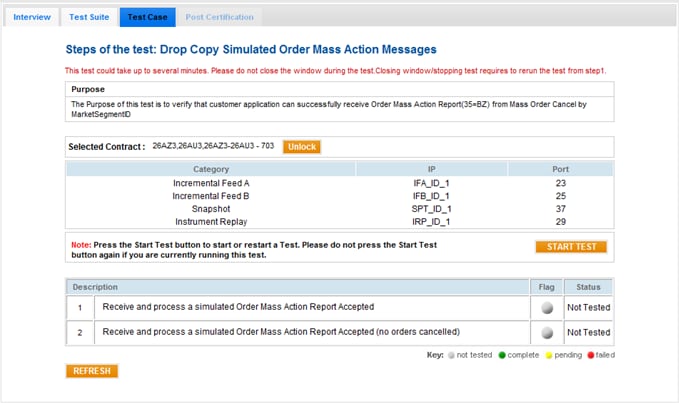
- To run a Receive Encapsulated Message from Simulated Order Mass Action Messages test:
- From the Contract drop-down, select the desired contract if the contract is not already locked.
- Click the START TEST button.
Note: DO NOT select the START TEST button once the test process is in progress.
- Enter the following tag values to verify that your system received the Order Mass Action Report (Accepted) message:
- tag 1300-MarketSegmentID
- tag 1374-MassActionScope
- tag 1375-MassActionResponse
- tag 533-TotalAffectedOrders
- tag 534-NoAffectedOrders
- tag 41-OrigClOrdID
- tag 84-CxlQty
- tag 535-AffectedOrderID
- tag 893-LastFragment
- Enter the following tag values to verify that your system received the Order Mass Action Report (Accepted, no orders cancelled) message:
- tag 1300-MarketSegmentID
- tag 1374-MassActionScope
- tag 1375-MassActionResponse
- tag 533-TotalAffectedOrders
- tag 893-LastFragment


