User Help System
Recovery Test
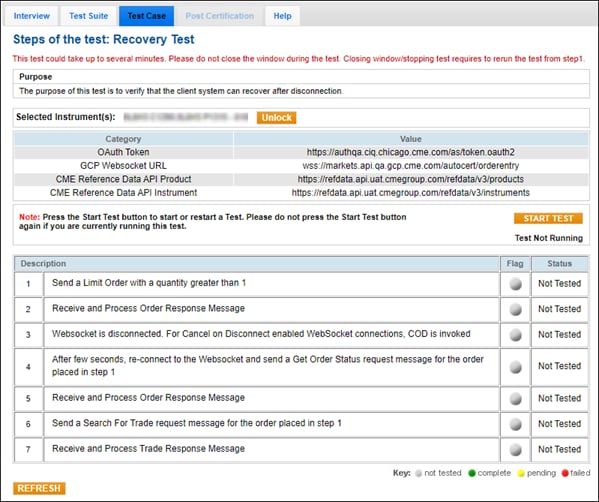
The purpose of this test is to verify that the client system can recover after disconnection.
Prior to beginning the test ensure an OAuth ID / Token is created, then select an Identifier and Instrument.
- Create an OAuth ID (if applicable) in CME Customer Center then retrieve the authentication token.
The OAuth ID and token is used to authenticate the websocket connection prior to running the test.
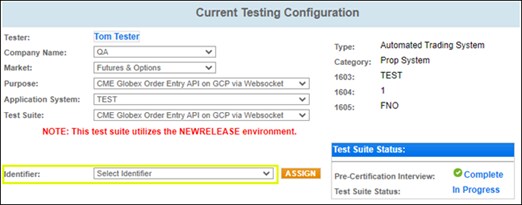
- From the drop down menu select an Identifier.
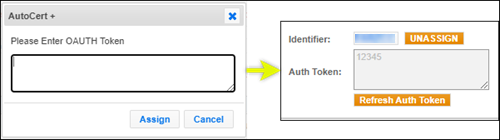
Enter the OAuth Token , then select ASSIGN.
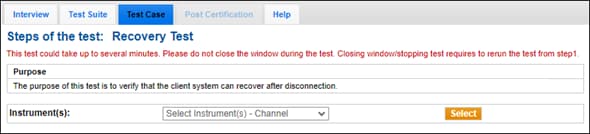
- On the selected Test Case screen, select an Instrument, then select START TEST.
- To run the Recovery test:
Note: For additional information and order entry message specifications, refer to the links in the below procedures.
- Send a Limit Order with a quantity (→ type=LIMIT, → qtyInt) greater than 1.
- Receive and Process Order Response Message.
- Websocket is disconnected. For Cancel on Disconnect enabled WebSocket connections, COD is invoked
- After few seconds, re-connect to the Websocket and send a Get Order Status request message for the order placed in step 1
- Receive and Process Order Response Message
- Send a Search For Trade request message for the order placed in step 1
- Receive and Process Trade Response Message, then validate the following values:
- price
- qtyint