User Help System
GET - Grantee Limits
The purpose of this verify that the client system can retrieve and set the limits for a grantee group for which they are permissioned.
Note: See the List Grantee Group Limits message specification for more information.
- Select an API ID and select ASSIGN API ID.
- Enter an OAUTH Token.
- Select Assign API ID.
Note: The Auth Token must be refreshed every 30 minutes.
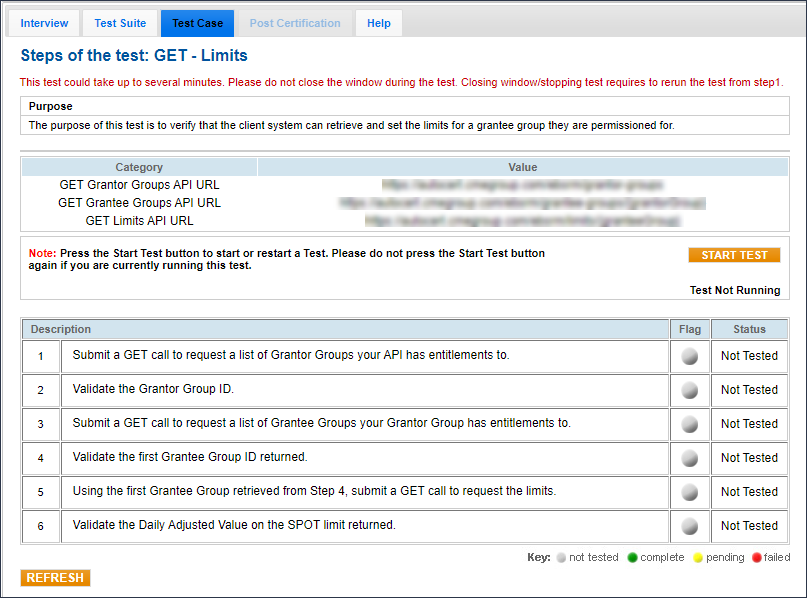
- To run a GET - Limits test:
- From the Test Suite tab, select GET - Grantee Limits, then select START TEST.
- Submit a GET call to request a list of Grantor Groups your API has entitlements to.
- Validate the Grantor Group ID returned.
Note: For additional details on Grantor Group tests (for steps 1-2), refer to GET - Grantor Groups.
- Submit a GET call to request a list of Grantee Groups your Grantor Group has entitlements to.
- Validate the first Grantee Group ID returned.
Note: For additional details on Grantee Group tests (for steps 3-4), refer to GET - Grantee Groups.
- Using the first Grantee Group retrieved from Step 4, submit a GET call to request the limits.
- Validate the Daily Adjusted Value (DAV) on the SPOT limit returned.


