User Help System
eFix Instrument Order Test
The purpose of this test is to verify the client system can submit an eFix instrument order and receive and process the Acknowledgment and Fill messages with fixing price for an eFix instrument.
- Select a SenderComp from the drop-down and select ASSIGN if a SenderComp is not already assigned.
- From the Contracts drop-down, select the desired contract if the contract is not already locked.
- Select the START TEST button.
Note: DO NOT select the START TEST button once the test is in progress.
Note: If a test is not proceeding to the next step, selecting the Refresh button ( ) below the test steps may resolve the issue.
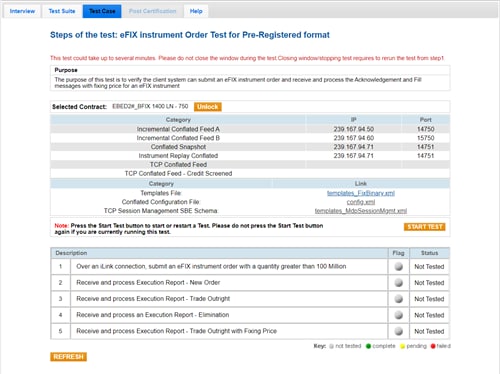
- To run an eFix Instrument Order test:
- Over an iLink connection, submit an eFix instrument order with a quantity greater than 100 Million
- Receive and process Execution Report - New Order.
- Receive and process Execution Report - Trade Outright.
- Receive and process an Execution Report - Elimination.
- Receive and process Execution Report - Trade Outright with Fixing Price.


