User Help System
Process Real-Time Messages for FAK/FOK During a Resend Response from CME Globex
The purpose of this test is to verify that the client system can receive out-of-sequence messages with message interleaving.
Note: FOK functionality is not available for Futures and Options.
- Select a SenderComp from the drop-down and select ASSIGN if a SenderComp is not already assigned.
- From the Contracts drop-down, select the desired contract if the contract is not already locked.
- Select the START TEST button.
Note: DO NOT select the START TEST button once the test is in progress.
Note: If a test is not proceeding to the next step, selecting the Refresh button ( ) below the test steps may resolve the issue.
Pre-Registered or On-Demand Format
Note: This test is used for both Pre-Registered and On-Demand formats. The image below shows the Pre-Registered format version of the test.
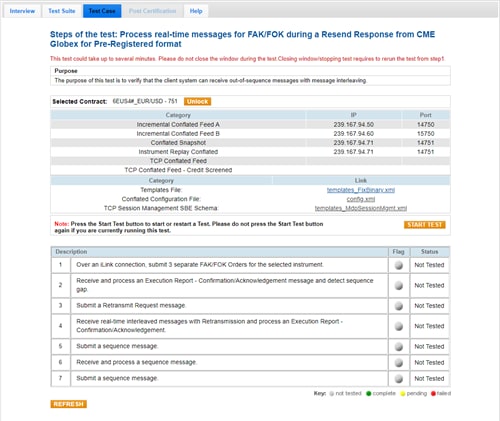
- To run a Process Real-Time Messages for FAK/FOK During a Resend Response from CME Globex test:
- Over an iLink connection, submit 3 separate FAK/FOK Orders for the selected outright instrument.
- Receive and process an Execution Report - New Order message and detect sequence gap.
- Submit a Retransmit Request message.
- Receive real-time interleaved messages with Retransmission and process an Execution Report - New Order message.
- Submit a Sequence message.
- Receive and process a Sequence message.
- Submit a Sequence message.


