User Help System
iLink Order Mass Status Request for All Working Orders for an Instrument Group
This test verifies that you can submit an (Order Mass Status Request (tag 35-MsgType=AF) and receive an Order Status Request acknowledgment (35-8, 150-I) when requesting the current state of all working orders for an instrument group.
- Select a SenderComp from the drop-down and select ASSIGN if a SenderComp is not already assigned.
- From the Contracts drop-down, select the desired contract if the contract is not already locked.
- Select the START TEST button.
Note: DO NOT select the START TEST button once the test is in progress.
Note: If a test is not proceeding to the next step, selecting the Refresh button ( ) below the test steps may resolve the issue.
Pre-Registered or On-Demand Format
Note: This test is used for both Pre-Registered and On-Demand formats. The image below shows the Pre-Registered format version of the test.
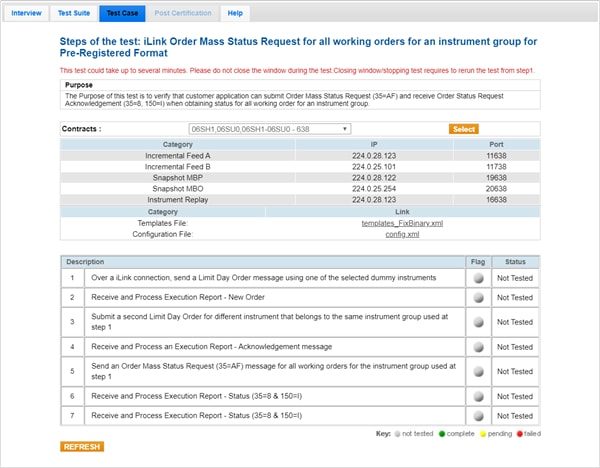
- To run an iLink Order Mass Status Request for All Working Orders for an Instrument Group test:
- Over a iLink connection, send a Limit Day Order message using one of the selected dummy instruments.
- Select "Yes" or "No" to indicate whether your system processed the Execution Report - New Order.
- Submit a second Limit Day Order for different instrument that belongs to the same instrument group used at step 1.
- Select "Yes" or "No" to indicate whether your system processed the Execution Report - New Order message.
- Send an Order Mass Status Request (35=AF) message for all working orders for the instrument group used at step 1.
- Enter the values from the following tags to confirm that your system received and processed the Execution Report - Status (35=8 & 150=I).
- Tag 39-OrdStatus
- Tag 912-LastRptRequested
- Tag 584-MassStatusReqID
- Enter the values from the following tags to confirm that your system received and processed the Execution Report - Status (35=8 & 150=I).
- Tag 39-OrdStatus
- Tag 912-LastRptRequested
- Tag 584-MassStatusReqID


