User Help System
Mid Week Logon
This test verifies that the client system can connect to the CME Group system during the week and maintain the correct inbound and outbound sequence numbers (tag 34-MsgSeqNum).
Additional Drop Copy Information
See the following documentation for more information on Drop Copy functionality:
- Drop Copy Service for iLink - EBS Market
- iLink 3 Binary Order Entry - EBS Market on CME Globex
- iLink FIX Tag Library
- Select a SenderComp from the drop-down and select ASSIGN if a SenderComp is not already assigned.
- Select the START TEST button.
Note: DO NOT select the START TEST button once the test is in progress.
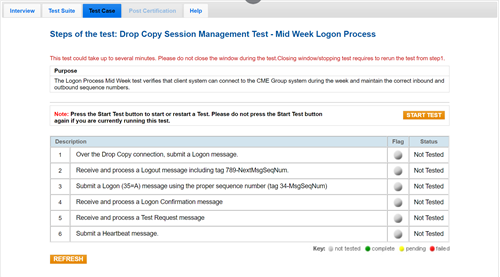
- To run the Mid Week Logon test:
- Over a Drop Copy connection, submit a Logon (35=A) message.
- Receive and process a Logout (35=5) message, including tag 789-NextMsgSeqNum.
- Submit a Logon (35=A) message using the correct sequence number (tag 34-MsgSeqNum).
- Receive and process a Logon (35=A) confirmation message.
- Receive and process a Test Request (35=1) message.
- Submit a Heartbeat (35=0) message.


