User Help System
Receive and Process Encapsulated Message
This test verifies that the client system can receive and process encapsulated XML non-FIX (35=n) messages with new BrokerTec tags provided in the Drop Copy payload.
Additional Drop Copy Information
See the following documentation for more information on Drop Copy functionality:
- iLink Binary Order Entry
- Drop Copy Service for iLink - BrokerTec Markets
- iLink Binary Order Entry - BrokerTec Markets
- iLink FIX Tag Library
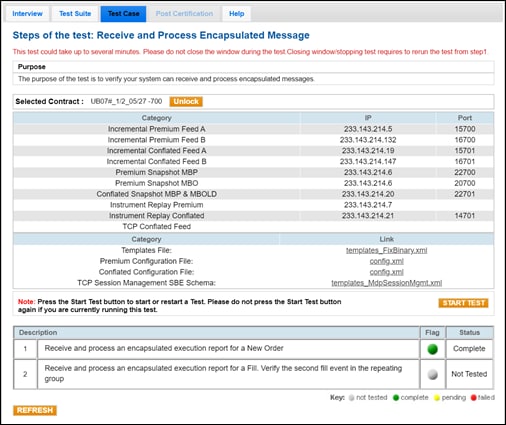
- To run the Receive and Process Encapsulated Message test:
- Select a SenderComp from the drop-down and select ASSIGN if a SenderComp is not already assigned.
- From the Contracts drop-down, select the desired contract if the contract is not already locked.
- Select the START TEST button.
Note: DO NOT select the START TEST button once the test is in progress.
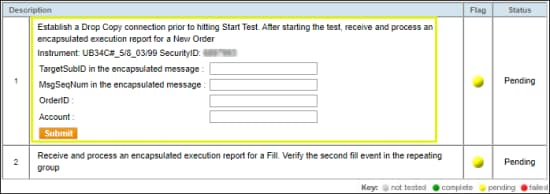
- Enter the following tag values to confirm that your system received and processed an encapsulated Execution Report for a New Order
- tag 57-TargetSubID
- tag 34-MsgSeqNum
- tag 37-OrderID
- tag 1-Account
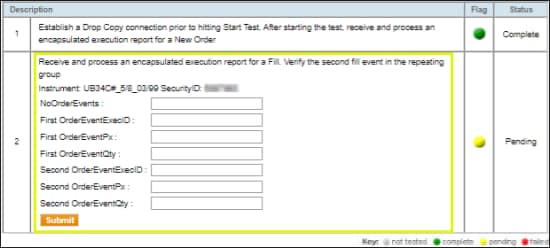
- Enter the following tag values to confirm that your system received and processed an encapsulated message for a Fill.
- tag 48-SecurityID: Provided in the test case
- tag 1795-NoOrderEvents
First Order
- →1797-OrderEventExecID
- →1799-OrderEvenPx
- →1800-OrderEventQTY
Second Order
- →1797-OrderEventExecID
- →1799-OrderEventPx
- →1800-OrderEventQTY
Example of Encapsulated Message: (Multiple Messages)
The FIX payload is shown in bold below.
[8=FIX.4.2|9=509|35=n|34=185|369=57|52=20200610-05:47:01.098|49=CME|50=98|56=717NEXN|57=CSET|143=SG|212=413|213=<RTRF>8=FIX.4.2|9=377|35=8|34=208|369=106|52=20200610-05:47:01.096|49=CME|50=98|56=EIVACPUSP|57=GUSUS|143=US,IL|1=ACP_ORDER|6=0|11=ACP1591768021071|14=0|17=9848:28271|20=0 37=982167244|38=67|39=0|40=2|41=0|44=130|48=3273848|54=2|55=#USBD|59=0|60=20200610-05:47:01.071|107=UB07#_1/2_05/27|150=0|151=67|167=TNOTE|432=20200610|819=0|1028=Y|1031=H|1598=1|5149=Memo ACPOS|5906=A|5979=1591768021071320596|10=249|</RTRF>|10=027|]


