User Help System
Full Start-of-Day Positions Upload
The purpose of this test is to verify the client system can submit a properly named and properly formatted Full Start of Day Positions file. System validations will check that the file name is the proper structure and required headers and columns are set properly (including case sensitivity).
- To select the Test:
- Select a Identifier from the drop-down and select ASSIGN if not already assigned.

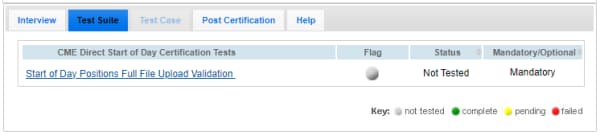
- From the Test Suite tab, select the linked test: Start of Day Positions Full File Upload Validation.
Note:If a test is not proceeding to the next step, clicking the Refresh button ( ) below the test steps may resolve the issue.
- To Upload and Validate CME Direct Start of Day Positions:
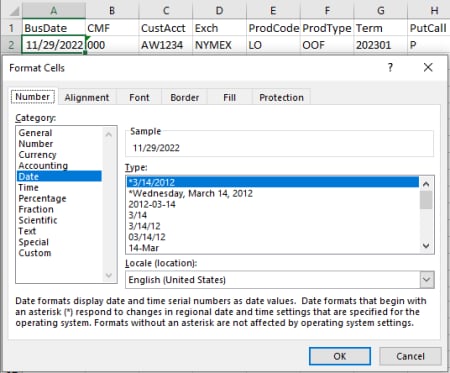
- Open the CSV file in MS Excel, then format cells:
- Right-click the BusDate cell(s) > Select Format Cells > Select Category: Date: *MM/DD/YYYY.
The BusDate field must include leading zeros, as applicable.
Example: January 1, 2025 will appear as 01/01/2025
- Right-click remaining cell(s) > Select Format Cells > Select Category: Text.
- Select OK.
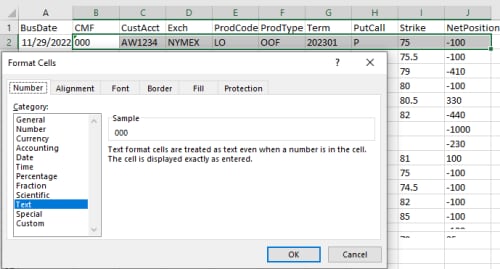
- Enter remaining position data in the file.
|
# |
Column Name |
Description |
Required |
Allowable Values |
|
1 |
BusDate |
- Current Business Date - The BusDate field must include leading zeros, as applicable. - Example: January 1, 2025 will appear as 01/01/2025 |
Y |
MM/DD/YYYY |
|
2 |
CMF |
Clearing member firm ID |
Y |
0_9; A_Z |
|
3 |
CustAcct
|
Account to which the position applies (clearing account identifier) |
Y |
0_9; A_Z |
|
4 |
Exch |
Product exchange code |
Y |
CME, CBT, NYMEX, COMEX, DME etc |
|
5 |
ProdCode |
CME Group product code |
Y |
Valid CME alphanumeric clearing product code (e.g. CL, LO) |
|
6 |
ProdType |
Product Type |
Y |
FUT, OOF, OOC |
|
7 |
Term |
Term Code |
Y |
Valid term code - format: YYYYMM, YYYYMMDD Examples: 202505 or 20250505 (May 2025 or May 5, 2025) |
|
8 |
PutCall |
Put / Call Indicator (required for option products) |
N |
P, C |
|
9 |
Strike |
Strike price: decimal format (required for option products) |
N |
Decimal Price This should use the same strike price convention as the ClearPort API. This is not necessarily the display convention used in either CMED or cmegroup.com. Example: Corn options with a strike of 500 cents is entered as "5" (dollars). |
|
10 |
NetPosition |
Net position Can be positive (long position) or negative (short position) |
Y |
Current Net long for this account / product. The position should be given in terms of cleared contracts, not the CME Globex quantity. Thus for flow products like Henry Hub LD Financial Futures (NN), where the contract is defined in terms of quantity per day, the position is the value after multiplying the Globex fill quantity by the number of days in the month (i.e. the ContractMultiplier from the SecurityDefinition). |
- Save the file in the following format:
- CMED.Positions.NNN.Full.YYYYMMDD.##.csv
Example: CMED.Positions.123.Full.01022025.1.csv
Example start of day position:
BusDate,CMF,CustAcct,Exch,ProdCode,ProdType,Term,PutCall,Strike,NetPosition
05/23/2025,123,ACC123,NYMEX,CL,FUT,202105,,,
05/23/2025,123,ACC123,NYMEX,LO,OOF,202105,P,49.5,5000
- Upload (Choose File > Browse) the full start of day positions file with today's date.

AutoCert+ validates the following:
- File Name: The following file name details are verified:
- Start of File begins with "CMED.Positions"
The file name may contain NR but it is not required
- Firm: Next three positions are the alphanumeric firm identifier
- The next characters are "Full"
- File Contents
If applicable, on-screen error messages will indicate information that must be updated.
Example error message: BusDate,CMF,CustAcct,Exch,ProdCode,ProdType,Term,PutCall,Strike,LineNo,Status,Message
04/23/2021,123,ACC123,NYMEX,CL,FUT,202105,,,8,WARN,Account ACC123 could not be found
04/23/2021,123,,COMEX,OG,OOF,202105,C,1760,301,ERROR,PA is required.


