User Help System
Multiple Parties via Snapshot Request
This test verifies that the client system can submit and maintain a Snapshot Request while processing Trade Capture Reports for multiple parties.
Note: The example test procedure below is for a Multiple Parties via Snapshot Request and may not appear in your test suite. The tests included in the test suite will depend on the answers you provided in the Interview.
- Select a SenderComp / API ID from the drop-down and select ASSIGN if not already assigned.
- (If applicable) From the Instrument(s) drop-down, select the desired instrument if the instrument is not already locked.
- Select the START TEST button.
Note: DO NOT select the START TEST button once the test is in progress.
Note: If a test is not proceeding to the next step, clicking the Refresh button ( ) below the test steps may resolve the issue.
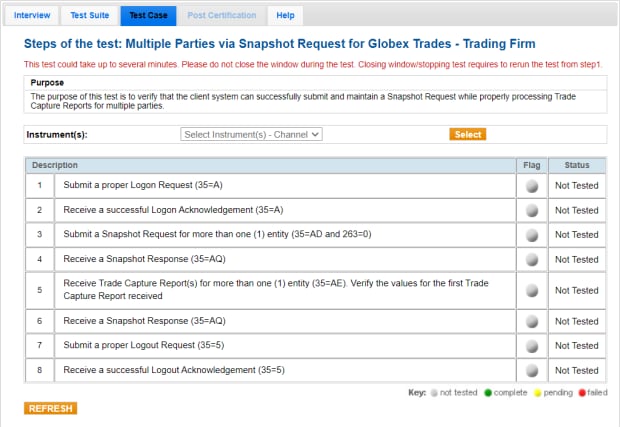
- To run a Multiple Parties via Snapshot Request test:
- Submit a Logon (35=A).
- Receive a Logon Acknowledgment (35=A).
- Submit a Snapshot Request (35=AD and 263=0) for more than one (1) entity.
- Receive a Snapshot Response (35=AQ).
- Receive Trade Capture Report(s) (35=AE) for more than one (1) entity. Enter the values for the first Trade Capture Report received:
- tag 48-Product Code (ID)
- tag 31-TradePrice (LastPx)
- tag 448-Party ID
- Receive a Snapshot Response (35=AQ).
- Submit a Logout Request (35=5).
- Receive a Logout Acknowledgment (35=5).


