User Help System
Outright Complete Order Test for Pre-Registered Format / On-Demand Format
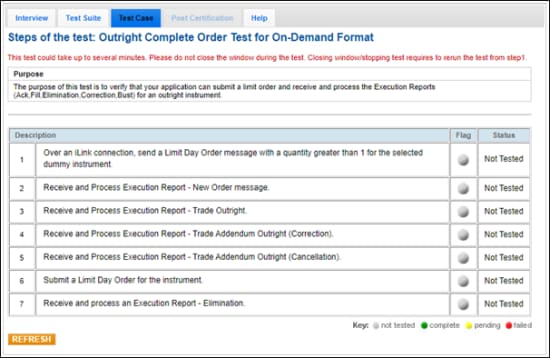
The purpose of this test is to verify that your application can submit a limit order and receive and process the Execution Reports (Ack, Fill, Elimination, Correction, Bust) for an outright instrument.
- To select the test:
- Select a SenderComp from the drop-down and select ASSIGN if not already assigned.
- From the Test Suite tab, select the linked test.
- Use the Instrument(s) drop down menu to choose an instrument and channel and click SELECT.
Note:
If a test is not proceeding to the next step, clicking the Refresh button ( ) below the test steps may resolve the issue.
Referential information is included for messages sent / received during the test.
- To run the Outright Complete Order Test:
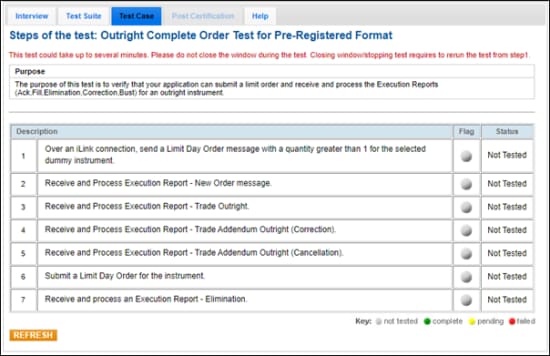
Note: This test is used for both Pre-Registered and On-Demand formats. The above image shows the Pre-Registered version of the test.
- Over an iLink connection, send a Limit Day Order [35=D (tag 40-OrdType=2, tag 59-TimeInForce=0)] message with a quantity (tag 38-OrderQty) greater than 1 for the selected dummy instrument.
- Receive and Process Execution Report - New Order message.
- Receive and Process Execution Report - Trade Outright.
- Receive and Process Execution Report - Trade Addendum Outright (Correction) (35=8, 39=H,G).
- Receive and Process Execution Report - Trade Addendum Outright (Cancellation) (35=8, 39=H,G).
- Submit a Limit Day Order [35=D (tag 40-OrdType=2, tag 59-TimeInForce=0)] for the instrument.
- Receive and process an Execution Report - Elimination (35=8, 39=C).
 On-Demand format screen