User Help System
Cross Order Cancel for Pre-Registered / On-Demand Format
The following instructions illustrate the process to run and complete Cross Order Cancel tests.
- To select the test:
- Select a SenderComp from the drop-down and select ASSIGN if not already assigned.
- From the Test Suite tab, select the linked test.
- Use the Instrument(s) drop down menu to choose an instrument and channel and click SELECT.
Note:
If a test is not proceeding to the next step, clicking the Refresh button ( ) below the test steps may resolve the issue.
Referential information is included for messages sent / received during the test.
- To run the Cross Order Cancel test:
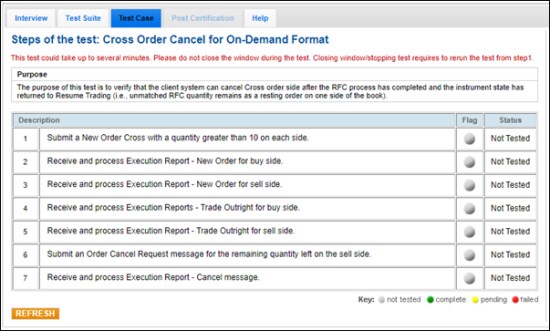
The purpose of this test is to verify that the client system can cancel Cross order side after the RFC process has completed and the instrument state has returned to Resume Trading (i.e., unmatched RFC quantity remains as a resting order on one side of the book).
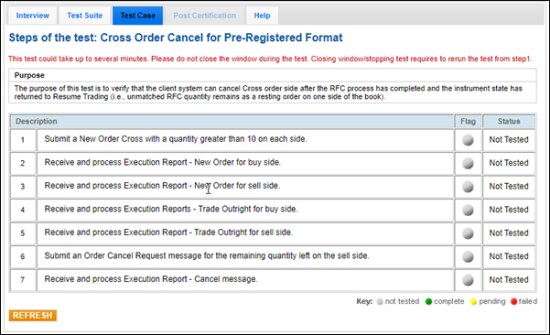
Note: This test is used for both Pre-Registered and On-Demand formats. The above image shows the Pre-Registered version of the test.
- Submit a New Order Cross (35=s) with a quantity (→38-OrderQty) greater than 10 on each side.
- Receive and process Execution Report - New Order (35=8, 39=0) for buy (tag 54-Side=1) side.
- Receive and process Execution Report - New Order (35=8, 39=0) for sell (tag 54-Side=2) side.
- Receive and process Execution Report - Trade Outright for the buy (tag 54-Side=1) side.
- Receive and process Execution Report - Trade Outright for the sell (tag 54-Side=2) side.
- Submit an Order Cancel Request (35=F) message for the remaining quantity left on the sell (tag 54-Side=2) side.
- Receive and process Execution Report - Cancel (35=8, 39=4) message.
 On-Demand Format screen