User Help System
Cancel on Behalf using Order Mass Action Request by Instrument Group
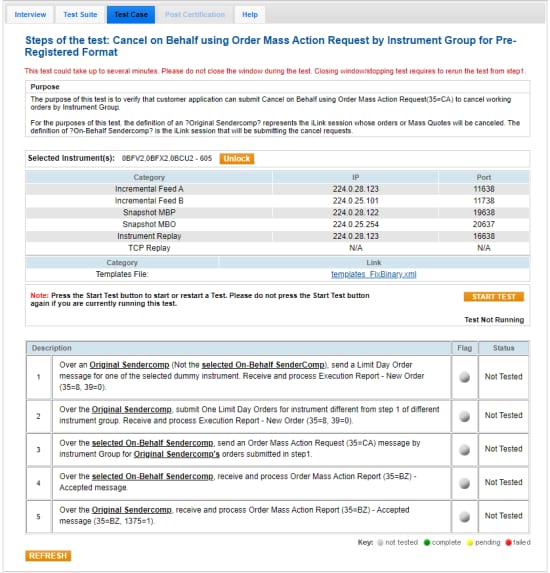
The purpose of this test is to verify that customer application can submit Cancel on Behalf using Order Mass Action Request(35=CA) to cancel working orders by Instrument Group.
For the purposes of this test, the definition of an Original SenderComp represents the iLink session whose orders or Mass Quotes will be canceled. The definition of On-Behalf SenderComp is the iLink session that will submit the cancel requests.
- To access the Cancel on Behalf - Order Mass Action Request by Instrument Group test:
- Select a SenderComp from the drop-down and select ASSIGN if an Instrument is not already assigned.
- From the Instrument(s) drop-down, Select the desired instrument if it is not already locked.
Test cases also require configuration of client system sessions using Category, IP and Port information provided on the AutoCert+ test screens.
- Select the START TEST button.
Note: DO NOT select the START TEST button once the test is in progress. If a test is not proceeding to the next step, selecting the Refresh button ( ) below the test steps may resolve the issue.
- To run a Cancel on Behalf - Order Mass Action Request by Instrument Group test:
- Over an Original SenderComp (Not the selected On-Behalf SenderComp), send a Limit Day Order (35=D) message for one of the selected dummy instrument.
- Receive and process an Execution Report - New Order (35=8, 39=0).
Select (Yes or No) to indicate whether the Execution Report - New Order message was processed.
- Over the Original SenderComp, submit One Limit Day Orders for a different instrument and different instrument group than step 1.
- Receive and process an Execution Report - New Order (35=8, 39=0).
Select (Yes or No) to indicate whether the Execution Report - New Order message was processed.
- Over the selected On-Behalf SenderComp, send an Order Mass Action Request (35=CA) message by instrument Group for Original SenderComp submitted in step 1.
- Over the selected On-Behalf SenderComp, receive and process the Order Mass Action Report (35=BZ) - Accepted message.
- Over the Original SenderComp, receive and process the Order Mass Action Report (35=BZ) - Accepted message (35=BZ, 1375=1).
Select (Yes or No) to indicate whether the Order Mass Action Report message was processed.