Create a Tailor Made EU Repo and Send an Order on the Newly Created Instrument
The purpose of this test is to verify that your application can perform the following for newly created instrument:
- create a User-Defined instrument
- send a New Order and a Cancel Request for the newly created instrument
Pre-Registered or On-Demand Format
Note: This test is used for both Pre-Registered and On-Demand formats. The below image shows the Pre-Registered format version of the test.
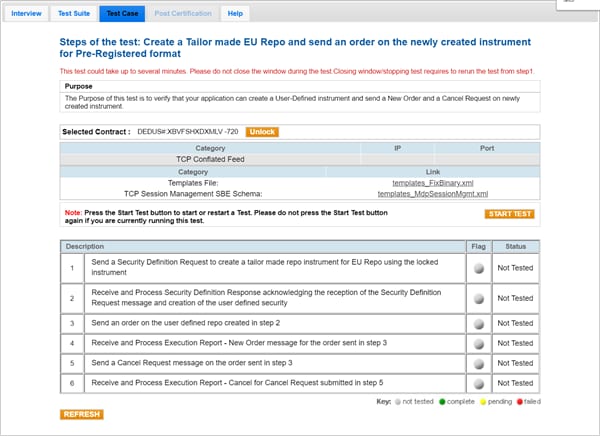
Note: If a test is not proceeding to the next step, selecting the Refresh button ( ) below the test steps may resolve the issue.
- To run a Create a Tailor Made Repo and Send an Order on the Newly Created Instrument test:
- Select a SenderComp from the drop-down and select ASSIGN if a SenderComp is not already assigned.
- From the Contracts drop-down, select the desired contract if the contract is not already locked.
- Select the START TEST button.
Note: DO NOT select the START TEST button once the test is in progress.
- Send a Security Definition Request to create a tailor made EU repo using the locked instrument.
- Select Yes or No to indicate whether your system received and processed the Security Definition Response acknowledging the reception of the Security Definition Request message and creation of the user defined security.
- Send an order on the user defined repo created in step 2.
- Select Yes or No to indicate whether your system received and processed the Execution Report - New Order message for the order sent in step 3.
Note: The following steps are not used for FAK only and FOK only systems.
- Send a Order Cancel Request message on the order sent in step 3.
- Select Yes or No to indicate whether your system received and processed the Execution Report - Cancel for the Cancel Request submitted in step 5.