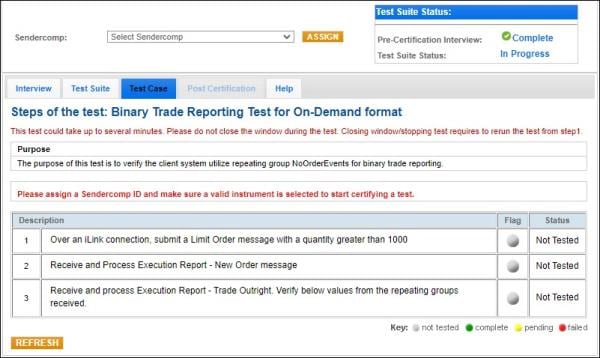
Binary Trade Reporting for Pre-Registered / On-Demand format
The purpose of this test is to verify the client system utilize repeating group NoOrderEvents [35=8, 39=1,2 (tag 1795)] for binary trade reporting.
If the customer application supports order entry, as indicated in the Interview, this test is mandatory.
- To run the Binary Trade Reporting test:
- Select a SenderComp from the drop-down and select ASSIGN if a SenderComp is not already assigned.
- Select an Instrument from the drop-down menu, then click Select.
- Select the START TEST button.
Note: DO NOT select the START TEST button once the test is in progress.
Note: This test is used for both Pre-Registered and On-Demand formats. The below image shows the Pre-Registered format version of the test.
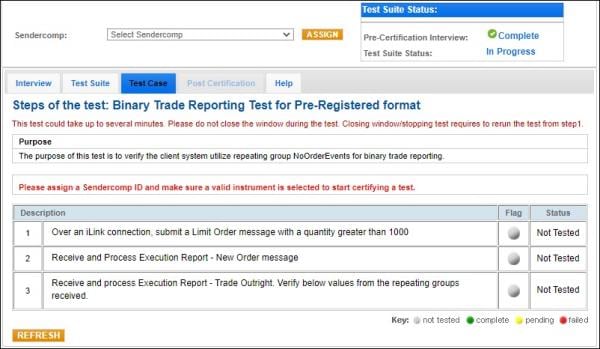
- Over an iLink connection, submit a Limit Order [35=D (tag 40-OrdType=2) (tag 59-TimeInForce=0, 3 or 4)] message with a quantity (tag 38-OrderQty) greater than 1000.
- Receive and Process Execution Report - New Order message (35=8, 39=0).
- Receive and process Execution Report - Trade Outright (35=8, 39=1,2) message, then enter the below values from the repeating groups received in the message:

- tag 1795-NoOrderEvents
First Order
- →1797-OrderEventExecID
- →1799-OrderEvenPx
- →1800-OrderEventQTY
Second Order
- →1797-OrderEventExecID
- →1799-OrderEventPx
- →1800-OrderEventQTY
 On-Demand format screen