FOK Order
The purpose of this test is to verify that the client system can perform the following for an outright instrument:
- submit an FOK (Fill or Kill) order
- receive and process the acknowledgment and fill messages
Pre-Registered and On-Demand Format
Note: This test is used for both Pre-Registered and On-Demand formats. The below image shows the Pre-Registered format version of the test.
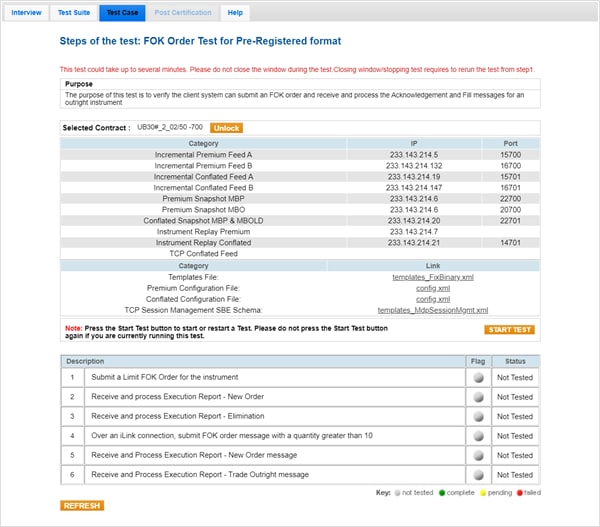
- To run an FOK test:
- Select a SenderComp from the drop-down and select ASSIGN if a SenderComp is not already assigned.
- From the Contracts drop-down, select the desired contract if the contract is not already locked.
- Select the START TEST button.
Note: DO NOT select the START TEST button once the test is in progress.
- Submit a Limit FOK Order for the instrument.
- Select Yes or No to indicate whether your system received and processed the Execution Report - New Order.
- Select Yes or No to indicate whether your system received and processed the Execution Report - Elimination.
- Submit a Limit FOK Order for the instrument with a quantity greater than 10.
- Select Yes or No to indicate whether your system received and processed the Execution Report - New Order.
- Select Yes or No to indicate whether your system received and processed the Execution Report - Trade Outright.