User Help System
Session Management Tests
The purpose of this test is to verify that the client system can successfully maintain an STP FIX Session.
Available Tests
Note: The test procedures below are for Globex and / or EBS Direct Session Management for Bank / Dealer. Additional options include: Prime Customer, Prime Broker, Prime of Prime Broker, which are dependent on responses provided in the Interview.
- To set up the selected test:
- After selecting a test case from the suite, select a SenderComp from the drop-down menu and ASSIGN (if not already selected).

- Select an Instrument from the drop-down menu and click Select if not already selected.

- Select START TEST to begin, then proceed to the instructions below.

Note: DO NOT select the "START TEST" button once the test is in progress.
Process a Test Request and Resend Request
The purpose of this test is to verify that the client system can successfully process a Test Request message and properly respond to a resend request.
- To run a Process a Test Request and Respond to Resend Request test:
- Submit a proper Logon Request [35=A (tag 141-ResetSeqNumFlag=Y)].
- Receive a successful Logon Acknowledgement (35=A).
- Submit a Trade Capture Report Request (35=AD).
- Receive a corresponding Trade Capture Report Acknowledgment [35=AQ (tag 749-TradeRequestResult=0)].
- Send a Heartbeat Message (35=0).
- Receive a Test Request Message (35=1).
- Send a Heartbeat Message in response (35=0).
- Receive a Resend Request (35=2).
- Submit a Sequence Reset-Gap Fill message [35=4 (tag 123-GapFillFlag=Y)].
- Receive a Heartbeat Message (35=0).
- Send Proper Heartbeat Message (35=0).
- Receive a Heartbeat Message (35=0).
 View Process a Test Request and Resend Request screen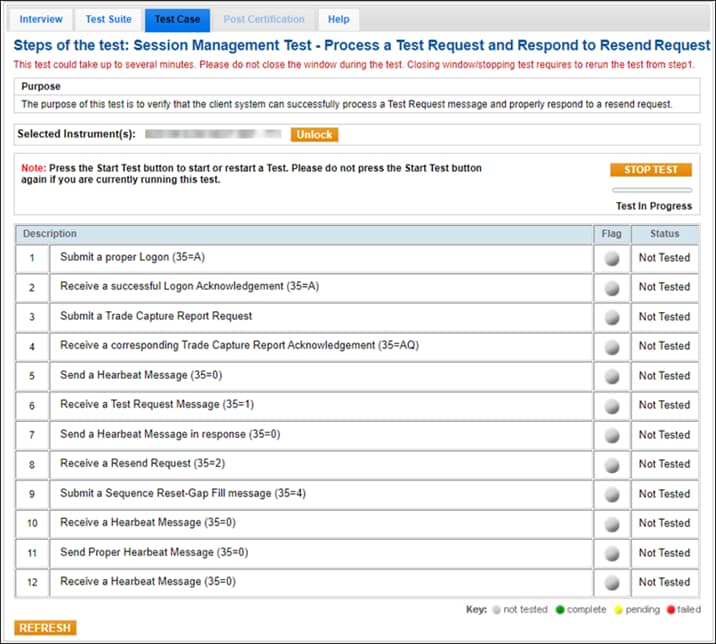
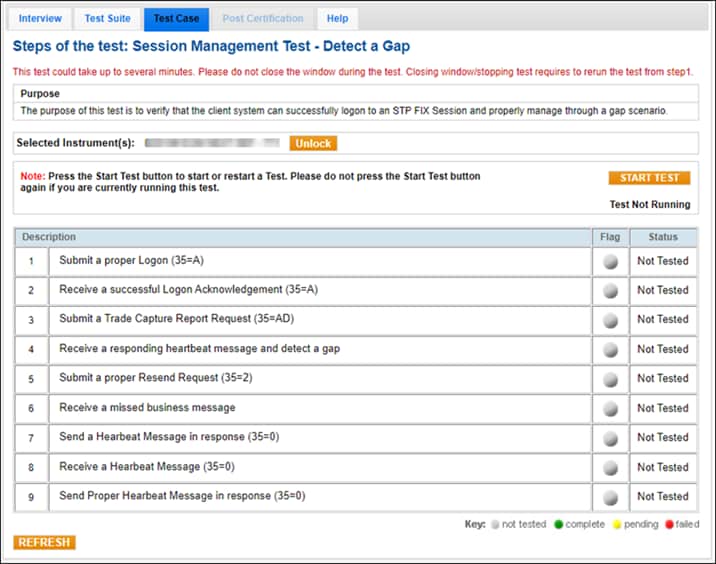
Detect a Gap
The purpose of this test is to verify that the client system can successfully logon to an STP FIX Session and properly manage through a gap scenario.
- To run a Detect a Gap test:
- Submit a proper Logon Request [35=A (tag 141-ResetSeqNumFlag=Y)].
- Receive a successful Logon Acknowledgement (35=A).
- Submit a Trade Capture Report Request (35=AD|263=1).
- Receive a responding heartbeat message and detect a gap.
- Submit a proper Resend Request [35=2 (tag 7-BeginSeqNo)].
- Receive a missed business message.
- Send a Heartbeat Message in response (35=0).
- Receive a Heartbeat Message (35=0).
- Send a proper Heartbeat Message in response (35=0).
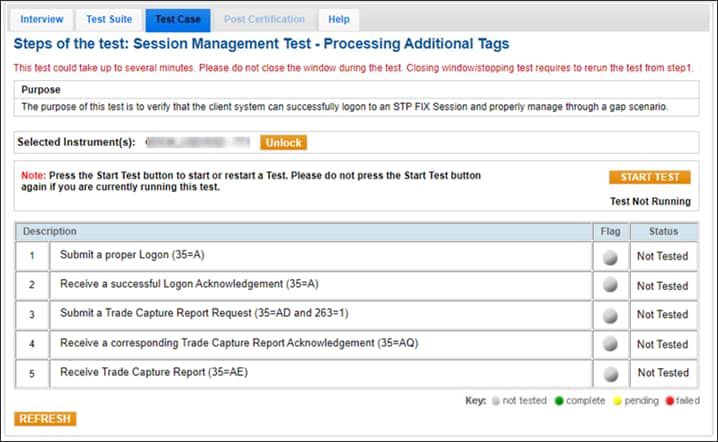
Processing Additional Tags
The purpose of this test is to verify that the client system can successfully logon to an STP FIX Session and properly manage through a gap scenario.
- To run a Process Additional Tag test:
- Submit a proper Logon (35=A).
- Receive a successful Logon Acknowledgement (35=A).
- Submit a Trade Capture Report Request [35=AD (tag 263-SubscriptionRequestType=1)].
- Receive a corresponding Trade Capture Report Acknowledgement (35=AQ).
- Receive Trade Capture Report (35=AE).