Security Status Request Verification (Snapshot and Updates)
This test verifies that your application can send and process Security Status Request messages.
- From the Contract drop-down, select the desired contracts if the contracts are not already locked.
- Select START TEST.
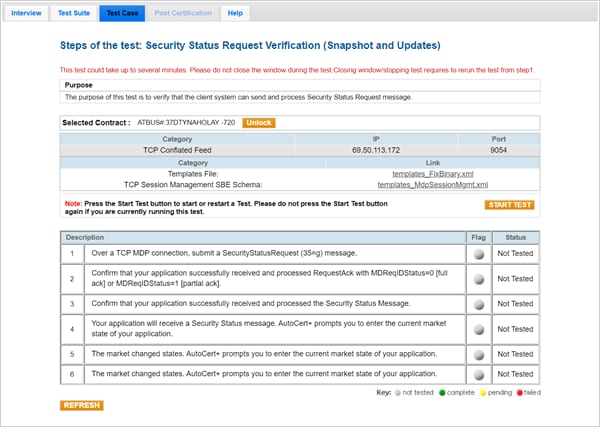
- To run the Security Status Request Verification (Snapshot and Updates) test:
- Over a TCP MDP connection, submit a SecurityStatusRequest (35=g) message.
- Select Yes or No to confirm that your application successfully received and processed the RequestAck with tag 37720-MDReqIDStatus=0 [full ack] or 1[partial ack].
- Confirm that your application successfully received and processed the Security Status Message. Enter the tag 326-SecurityTradingStatus value.
- Your application will receive a Security Status message. Select the current market state of your application in the Security Status drop-down list.
- Trading halt
- Close
- Ready To Trade
- The market changed states. Enter the current market state of your application. Select the current market state of your application in the Security Status drop-down list.
- Trading halt
- Close
- Ready To Trade
- The market changed states. Enter the current market state of your application. Select the current market state of your application in the Security Status drop-down list.
- Trading halt
- Close
- Ready To Trade