Utilizing Stop Orders
Stop orders are an important tool that traders should consider when building their trade plan. A frequent question from new traders is, “How do I know where to place my stop orders?” While many traders use price action in their trading plan to identify exit points, the specifics for each individual trader will be unique.
Let’s look at a few examples of how Bob Iaccino uses price action to indicate the placement of a stop order.
Stop orders are an important tool that traders should consider when building their trade plan. A frequent question from new traders is, “How do I know where to place my stop orders?” While many traders use price action in their trading plan to identify exit points, the specifics for each individual trader will be unique.
Let’s look at a few examples of how Bob Iaccino uses price action to indicate the placement of a stop order.
Example 1
The first example is in the Crude Oil (CL) contract. There is a horizontal channel in the approximate range of 34.63 to 47.93. The midpoint of the channel is approximately 41.28. Bob enters a long position by buying at 48.00. Bob places his stop order somewhere below the midpoint of the channel – as this is a price action-based stop. He feels that if the price goes through the midpoint, it is likely that the price will return to the bottom of the channel. He places a stop order below the midpoint at 39.40. This would be 860 ticks or $8,600 of risk per contract.
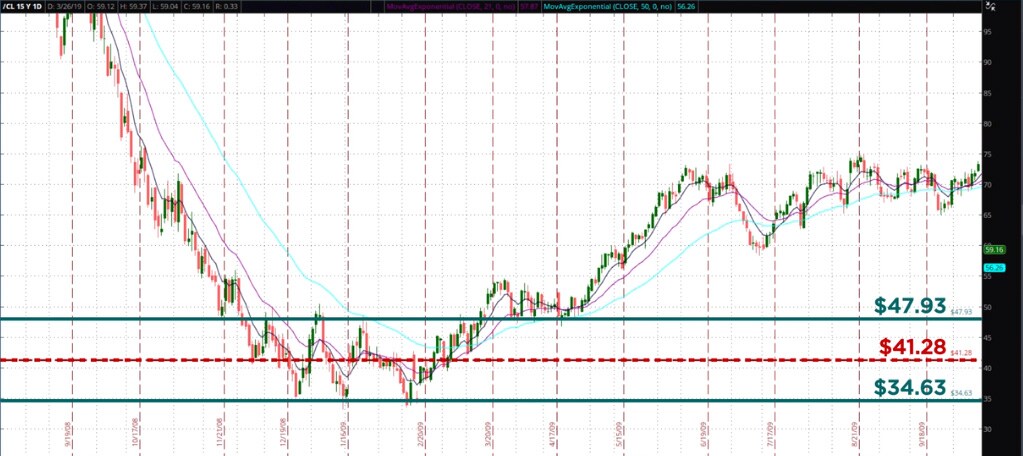
As an alternative, a trader could trade the E-mini Crude (QM). Since the E-mini Crude is half the size of the CL contract, the dollar amount at risk would be $4,300.
In this example, if a trader wanted to place a stop based on $1,000 of risk, they would have been stopped out of the trade before the trade eventually became profitable. If the trader only wanted to risk this amount on a trade, then he should have avoided this contract at this point in time due to the high volatility.
Example 2
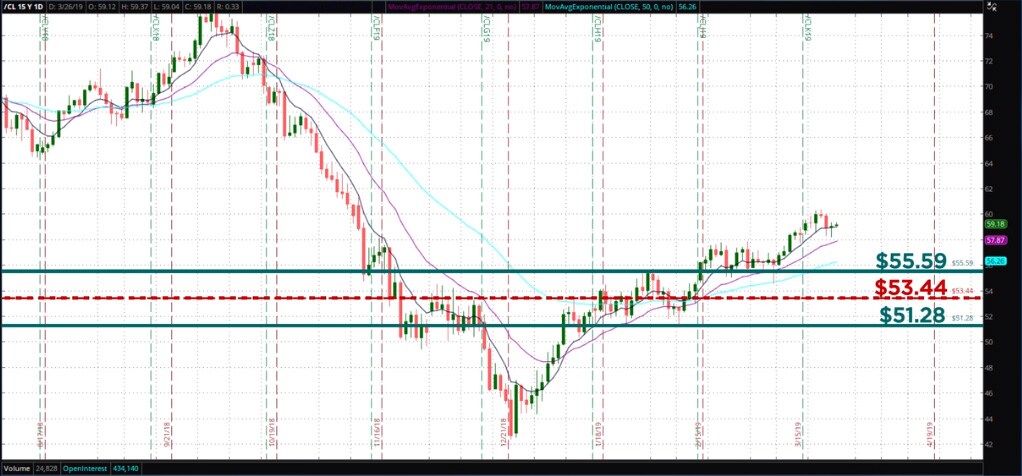
In this next example, the channel range is approximately 51.28-55.59. The smaller range is indicative of lower volatility. After entering a long CL position at 55.60, Bob places his sell stop order below the midpoint of the range (53.44) at 53.37. This is 223 ticks or $2,230. Again, trading the E-mini Crude would reduce the risk by half to $1,115. If a trader only wanted to risk $1,000, a stop would need to be placed at 54.60. In this example, the trade would have been stopped out at 54.52 before the trade became profitable.
Summary
In Bob’s two examples, the price action dictates where he places his stop orders. If you are going to enter trades based on price action, Bob suggests using price action to generate your stop prices. Of course, before you enter a trade you must determine if the trade fits into your risk profile or not. Price action is very important in trade entries, targets and stops.
Activities
These are optional, activities do not count towards you lesson completion.
Using the price levels provided, enter the Stop Order price for each trade.
- Product: -Micro E-mini S&P 500 (MES) 2) Order Entry Price: 3233.50 3) Side: Buy 4) Ticks at Risk: 80
Using the price levels provided, enter the Stop Order price for each trade.
- Product: Micro E-mini S&P 500 (MES) 2) Order Entry Price: 3233.50 3) Side: Sell 4) Ticks at Risk: 320
Using the price levels provided, enter the Stop Order price for each trade.
- Product: Micro E-mini Nasdaq 100 (NQ) 2) Order Entry Price: 10581.00 3) Side: Buy 4) Ticks at Risk: 2000
Using the price levels provided, enter the Stop Order price for each trade.
- Product: Micro E-mini Nasdaq 100 (NQ) 2) Order Entry Price: 10550.00 3) Side: Sell 4) Ticks at Risk: 1000
Using the price levels provided, enter the Stop Order price for each trade.
- Product: WTI Crude Oil (CL) 2) Order Entry Price: 91.05 3) Side: Buy 4) Ticks at Risk: 25
Using the price levels provided, enter the Stop Order price for each trade.
- Product: Gold (GC) 2) Order Entry Price: 1500.50
- Side: Buy 4) Ticks at Risk: 250
Using the price levels provided, enter the Stop Order price for each trade.
- Product: Micro Gold (MGC)
- Order Entry Price: 1885.60 3) Side: Buy 4) Ticks at Risk: 350