https://www.cmegroup.com/content/dam/cmegroup/images/common/default/article-brightcove-1440x500.jpg

Delegated Intermediary – Tiered Account Structure for Clearing Members
Create a Delegated Intermediary Account
How to Setup Delegated Intermediary account:
Setting up a Delegated Intermediary account is the same process as creating a standard CME ClearPort account. Check the box ”Enable” on the Accounts tab next to ”Delegated Intermediary (DI)” as highlighted below.
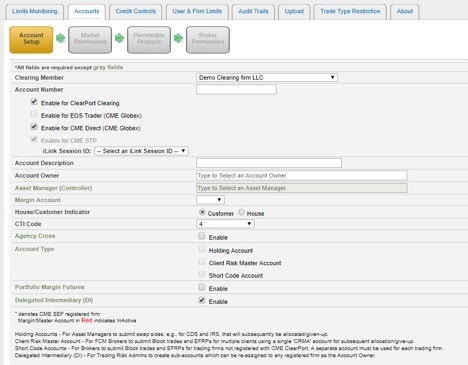
To set up a Delegated Intermediary account the sub account firm will need to be CME ClearPort registered
If a firm is not registered, they must visit www.cmegroup.com/clearport/registration.html and have a risk administrator at the firm register for Account Manager.
Steps for Account Setup
1. Create Delegated Intermediary account via CME Account Manager
- Create Account Number
- Enable for CME ClearPort Clearing and/or CME Direct (CME Globex)
- Select Account Owner (account owner will be the Delegated Intermediary firm name)
- Check 'Enable' box for “Delegated Intermediary (DI)”
2. Set Market Permissions for a Delegated Intermediary account
- Choose which markets the sub accounts will have access to
- To give access to all products at an exchange select all
- To permission on an individual product level select specific and choose products on the next page
3. Set Broker Permissions
- Select Brokers that Delegated Intermediary will be allowed to choose from when assigning brokers to Delegated Intermediary sub accounts
Note: only brokers enabled at the Delegated Intermediary parent account level will be available for all associated sub accounts
4. Set the risk levels of Delegated Intermediary account
- Apply overall Delegated Intermediary account credit limit amount in RAV field
- Quantity credit limits on individual products that will filter to Delegated Intermediary sub accounts can also be set
- To edit credit levels, click on “Credit Control Info”
Note: Delegated Intermediary trading sub accounts will inherit: SEG TYPE, CTI code. These fields will not be editable at the trading sub account level. Market permissions, product permissions, and broker permissions are also inherited from the clearing account but a Delegated Intermediary can select from the inherited permissions to set further controls at the sub account level.
Inform Risk Administrator at Delegated Intermediary of account availability
Contact the onboarding team at EASE.AtYourService@cmegroup.com with any questions.